> ## Documentation Index
> Fetch the complete documentation index at: https://cometchat-22654f5b-feature-android-multimedia-attachments.mintlify.site/llms.txt
> Use this file to discover all available pages before exploring further.
# Core
> Overview of CometChat's core chat features including instant messaging, media sharing, read receipts, typing indicators, user presence, reactions, mentions, threaded conversations, and moderation.
| Field | Value |
| -------------- | --------------------------------------------------------------------------------------------------------------------------------------------------------------------------------------------------------------------------------- |
| Packages | `com.cometchat:chatuikit-kotlin-android` (Kotlin XML Views), `com.cometchat:chatuikit-compose-android` (Jetpack Compose) |
| Required setup | `CometChatUIKit.init()` then `CometChatUIKit.login()` — must complete before rendering any component |
| Core features | Instant Messaging, Media Sharing, Read Receipts, Mark as Unread, Typing Indicator, User Presence, Reactions, Mentions, Rich Text Formatting, Quoted Reply, Search, Threaded Conversations, Moderation, Report Message, Group Chat |
| Key components | `CometChatConversations`, `CometChatMessageList`, `CometChatMessageComposer`, `CometChatMessageHeader`, `CometChatUsers`, `CometChatGroups`, `CometChatGroupMembers`, `CometChatMessageInformation`, `CometChatThreadHeader` |
| Theming | See [Theming](/ui-kit/android/v6/theme-introduction) |
The UI Kit components work together to deliver a complete chat experience. The sections below map each core feature to the components that power it.
## Instant Messaging
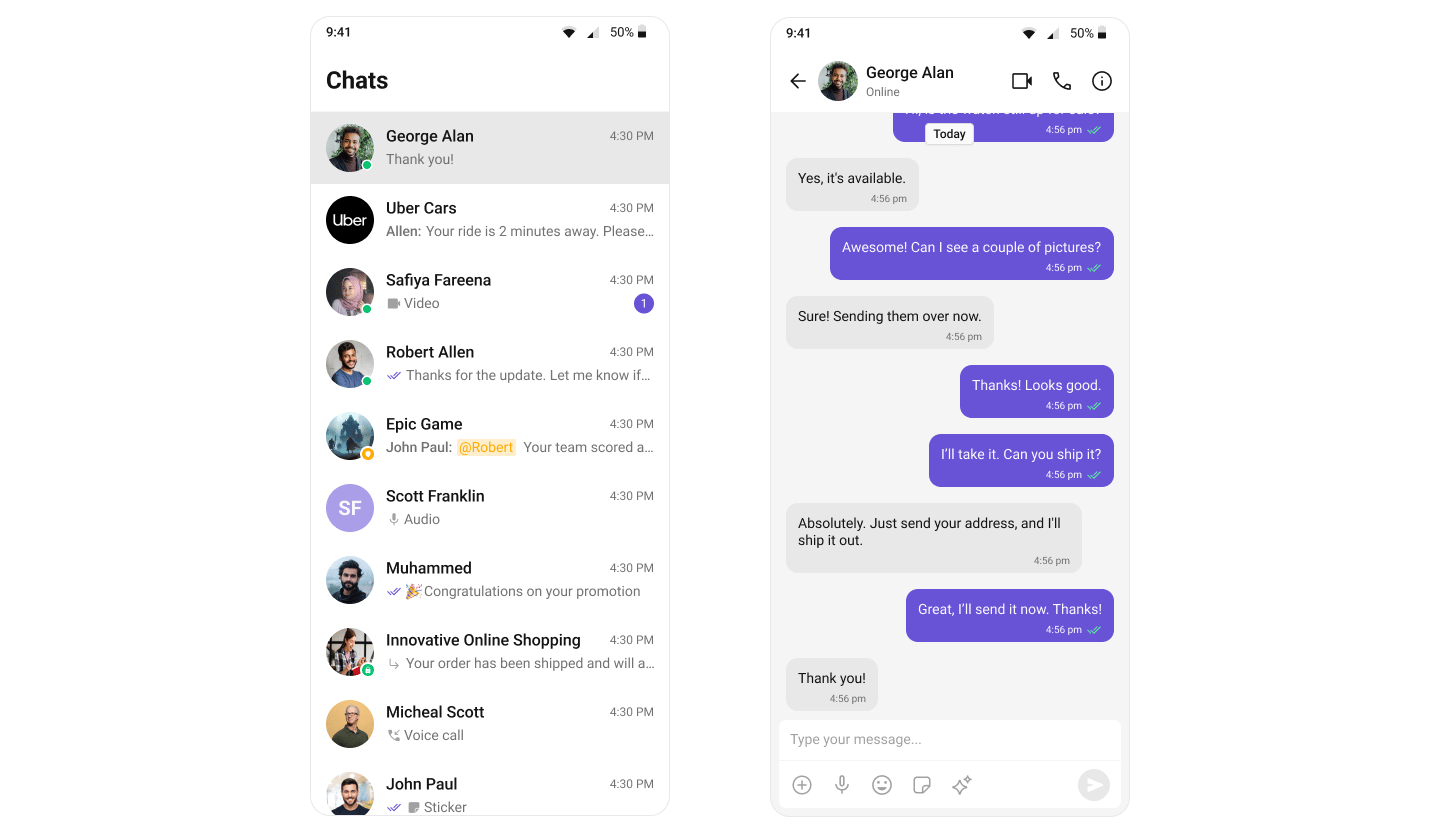
Real-time text messaging — users can send and receive instant messages.
 | Component | Role |
| --------------------------------------------------------------- | ------------------------------------------------------ |
| [CometChatMessageComposer](/ui-kit/android/v6/message-composer) | Enables users to write and send text messages. |
| [CometChatMessageList](/ui-kit/android/v6/message-list) | Renders sent and received messages using text bubbles. |
## Media Sharing
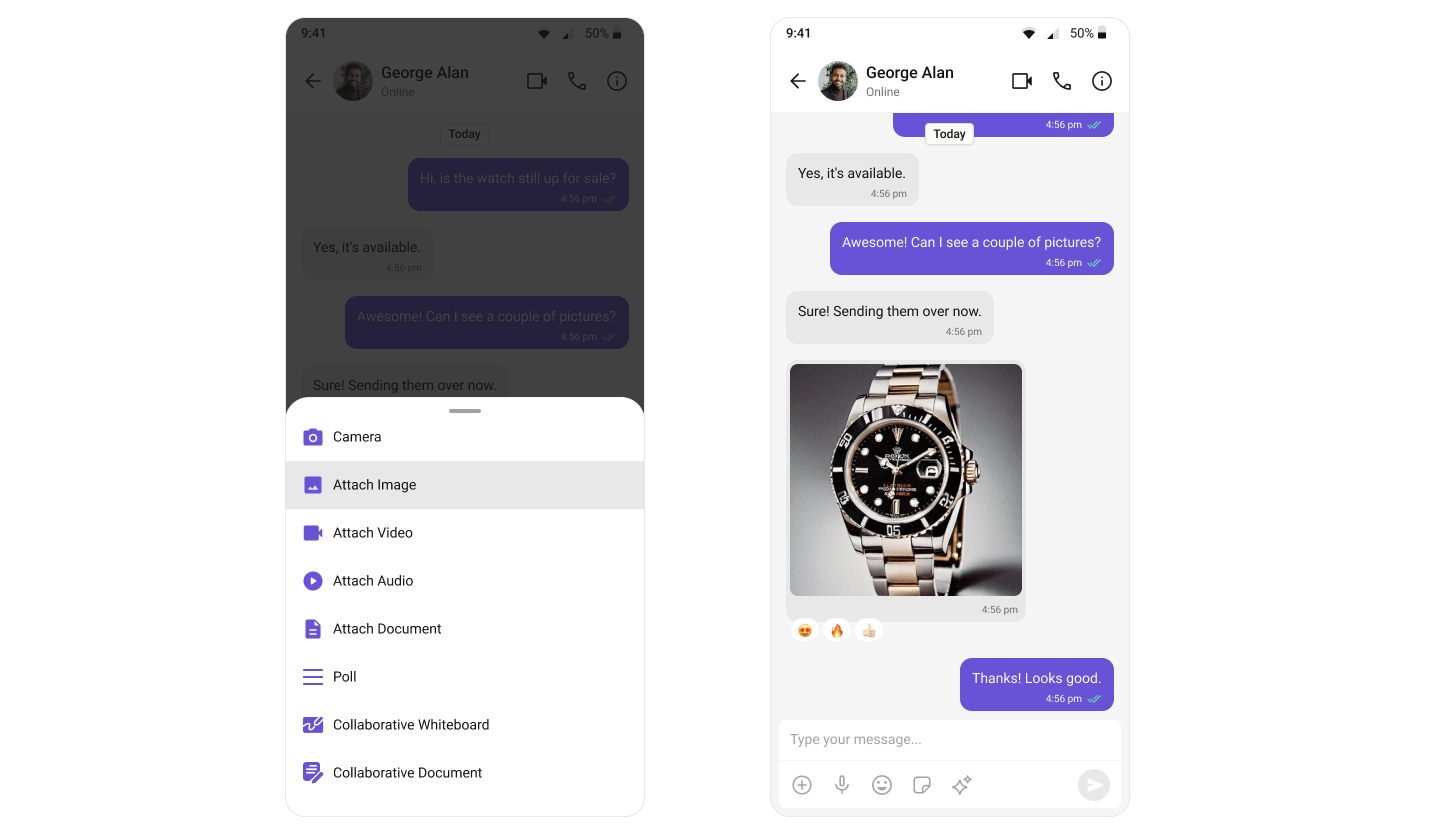
Share multiple images, videos, audio files, and documents in a single send. Tapping the attachment button opens a multi-select picker; the picks stage in a preview tray above the input box with per-file upload progress, and send together with an optional caption — all out of the box.
| Component | Role |
| --------------------------------------------------------------- | ------------------------------------------------------ |
| [CometChatMessageComposer](/ui-kit/android/v6/message-composer) | Enables users to write and send text messages. |
| [CometChatMessageList](/ui-kit/android/v6/message-list) | Renders sent and received messages using text bubbles. |
## Media Sharing
Share multiple images, videos, audio files, and documents in a single send. Tapping the attachment button opens a multi-select picker; the picks stage in a preview tray above the input box with per-file upload progress, and send together with an optional caption — all out of the box.
 | Component | Role |
| ------------------------------------------------------------------------------------ | ------------------------------------------------------------------------------------------------------------- |
| [CometChatMessageComposer](/ui-kit/android/v6/message-composer#multiple-attachments) | Multi-select picker, an attachment tray that uploads before send, and the composer text as the batch caption. |
| [CometChatMessageList](/ui-kit/android/v6/message-list#multiple-attachments) | Renders received attachments with per-type bubbles and groups a multi-type send as one visual batch. |
A mixed pick is split into one message per attachment type (images → videos → audios → files) that render as grouped bubbles: an image/video **grid**, a stacked **audio player** list, and a connected **file card** stack. Per-message file count and per-file size limits come from your app's dashboard settings.
**Supported media types:**
| Type | Single | Multiple |
| ------ | ------------------------------------------------------------------------------------ | ---------------------------------------------------------------------------------- |
| Images | [Image Bubble](/ui-kit/android/v6/message-bubble-styling#image-bubble) | [Media Grid Bubble](/ui-kit/android/v6/message-bubble-styling#media-grid-bubble) |
| Videos | [Video Bubble](/ui-kit/android/v6/message-bubble-styling#video-bubble) | [Media Grid Bubble](/ui-kit/android/v6/message-bubble-styling#media-grid-bubble) |
| Audio | [Audio Bubble](/ui-kit/android/v6/message-bubble-styling#audio-bubble) (voice notes) | [Audio Files Bubble](/ui-kit/android/v6/message-bubble-styling#audio-files-bubble) |
| Files | [File Bubble](/ui-kit/android/v6/message-bubble-styling#file-bubble) | [Files Bubble](/ui-kit/android/v6/message-bubble-styling#files-bubble) |
## Read Receipts
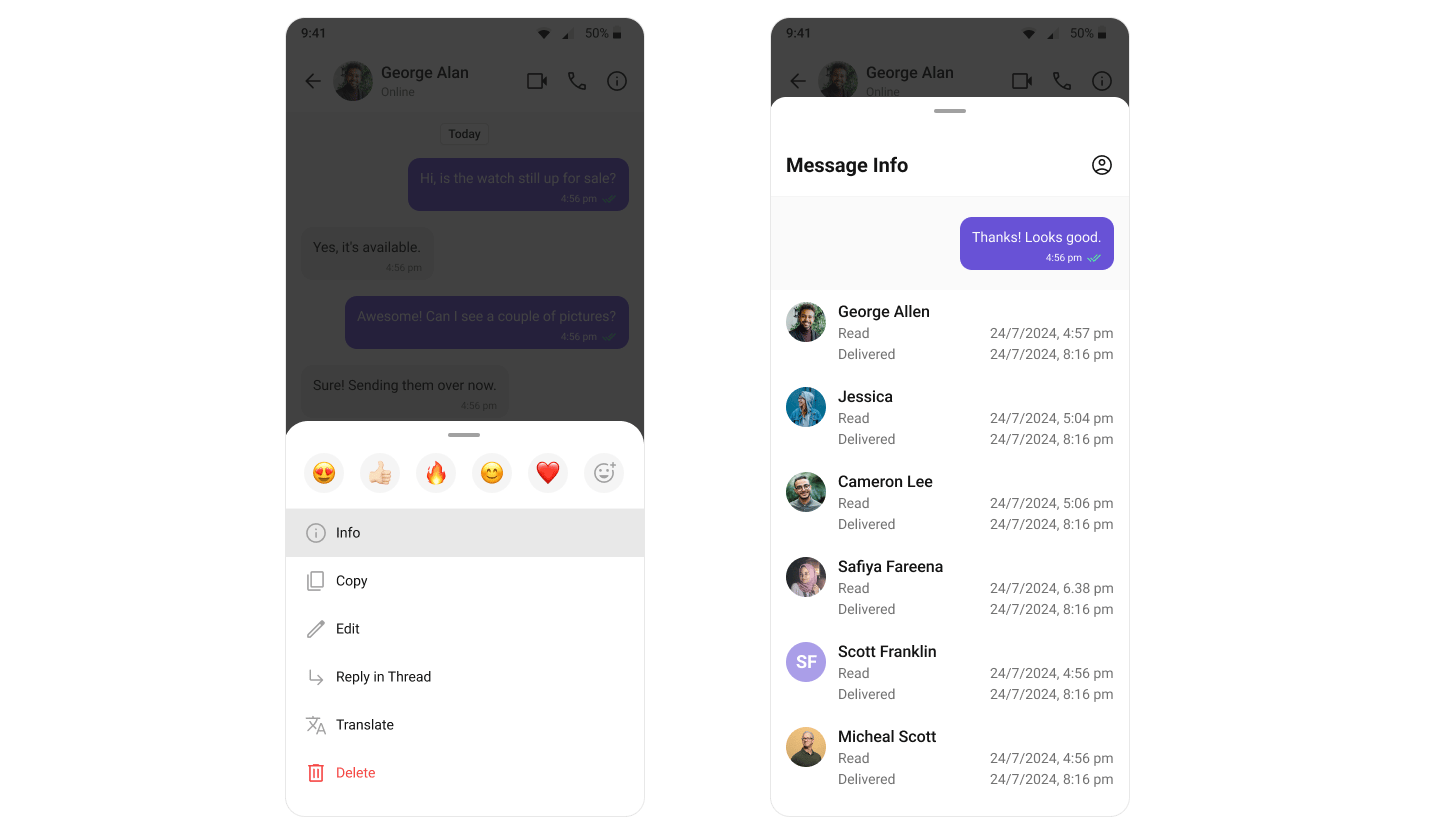
Visibility into message status — delivered and read indicators.
| Component | Role |
| ------------------------------------------------------------------------------------ | ------------------------------------------------------------------------------------------------------------- |
| [CometChatMessageComposer](/ui-kit/android/v6/message-composer#multiple-attachments) | Multi-select picker, an attachment tray that uploads before send, and the composer text as the batch caption. |
| [CometChatMessageList](/ui-kit/android/v6/message-list#multiple-attachments) | Renders received attachments with per-type bubbles and groups a multi-type send as one visual batch. |
A mixed pick is split into one message per attachment type (images → videos → audios → files) that render as grouped bubbles: an image/video **grid**, a stacked **audio player** list, and a connected **file card** stack. Per-message file count and per-file size limits come from your app's dashboard settings.
**Supported media types:**
| Type | Single | Multiple |
| ------ | ------------------------------------------------------------------------------------ | ---------------------------------------------------------------------------------- |
| Images | [Image Bubble](/ui-kit/android/v6/message-bubble-styling#image-bubble) | [Media Grid Bubble](/ui-kit/android/v6/message-bubble-styling#media-grid-bubble) |
| Videos | [Video Bubble](/ui-kit/android/v6/message-bubble-styling#video-bubble) | [Media Grid Bubble](/ui-kit/android/v6/message-bubble-styling#media-grid-bubble) |
| Audio | [Audio Bubble](/ui-kit/android/v6/message-bubble-styling#audio-bubble) (voice notes) | [Audio Files Bubble](/ui-kit/android/v6/message-bubble-styling#audio-files-bubble) |
| Files | [File Bubble](/ui-kit/android/v6/message-bubble-styling#file-bubble) | [Files Bubble](/ui-kit/android/v6/message-bubble-styling#files-bubble) |
## Read Receipts
Visibility into message status — delivered and read indicators.
 | Component | Role |
| --------------------------------------------------------------------------------------- | ----------------------------------------------------------------------- |
| [CometChatConversations](/ui-kit/android/v6/conversations) | Displays delivery status of the last message in each conversation item. |
| [CometChatMessageList](/ui-kit/android/v6/message-list) | Shows read receipt status on every message bubble. |
| [CometChatMessageInformation](/ui-kit/android/v6/component-styling#message-information) | Shows detailed delivery and read status for a specific sent message. |
## Mark as Unread
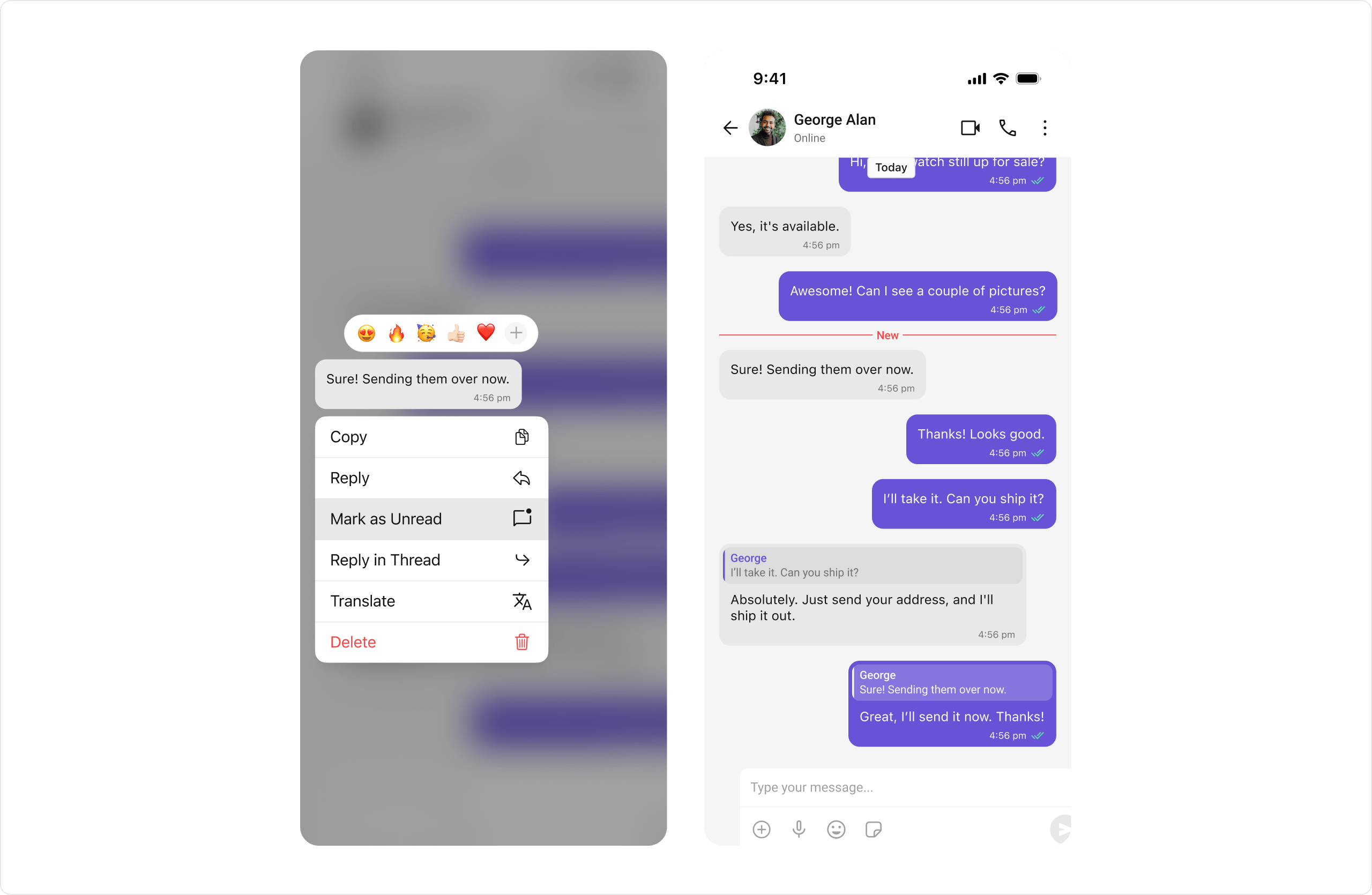
Users can manually mark messages as unread to revisit important conversations later. The message list can start from the first unread message automatically.
| Component | Role |
| --------------------------------------------------------------------------------------- | ----------------------------------------------------------------------- |
| [CometChatConversations](/ui-kit/android/v6/conversations) | Displays delivery status of the last message in each conversation item. |
| [CometChatMessageList](/ui-kit/android/v6/message-list) | Shows read receipt status on every message bubble. |
| [CometChatMessageInformation](/ui-kit/android/v6/component-styling#message-information) | Shows detailed delivery and read status for a specific sent message. |
## Mark as Unread
Users can manually mark messages as unread to revisit important conversations later. The message list can start from the first unread message automatically.
 | Component | Role |
| ---------------------------------------------------------- | ------------------------------------------------------------------------------------------------------------ |
| [CometChatMessageList](/ui-kit/android/v6/message-list) | Provides the "Mark as unread" option in message actions and supports starting from the first unread message. |
| [CometChatConversations](/ui-kit/android/v6/conversations) | Reflects updated unread count in real-time. |
## Typing Indicators
Shows when a user is typing a response in real-time.
| Component | Role |
| ---------------------------------------------------------- | ------------------------------------------------------------------------------------------------------------ |
| [CometChatMessageList](/ui-kit/android/v6/message-list) | Provides the "Mark as unread" option in message actions and supports starting from the first unread message. |
| [CometChatConversations](/ui-kit/android/v6/conversations) | Reflects updated unread count in real-time. |
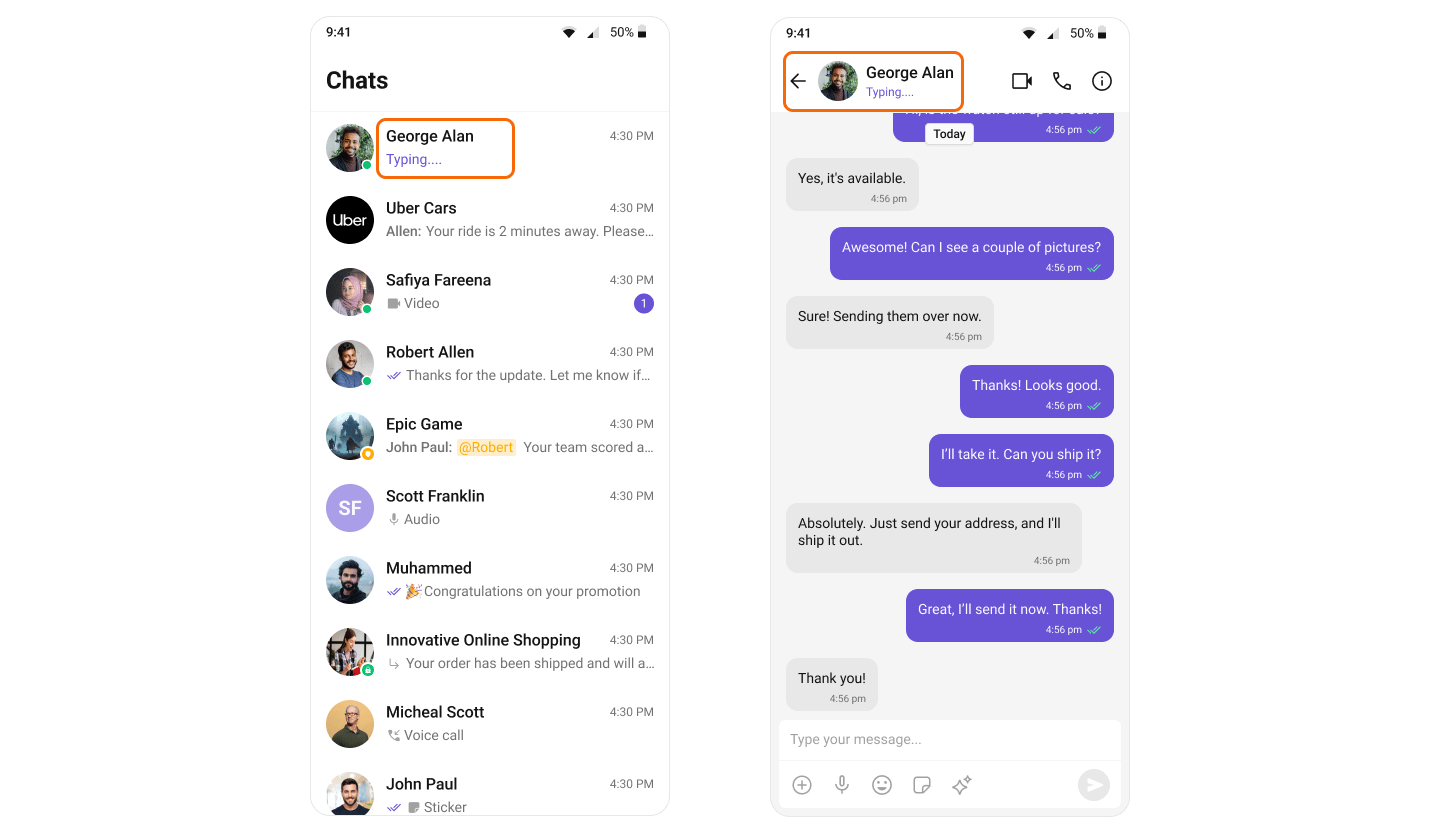
## Typing Indicators
Shows when a user is typing a response in real-time.
 | Component | Role |
| ----------------------------------------------------------- | --------------------------------------------------------------------------------- |
| [CometChatConversations](/ui-kit/android/v6/conversations) | Shows real-time typing status in conversation items. |
| [CometChatMessageHeader](/ui-kit/android/v6/message-header) | Displays a "typing..." indicator when the other user or a group member is typing. |
## User Presence
See whether contacts are online or offline.
| Component | Role |
| ----------------------------------------------------------- | --------------------------------------------------------------------------------- |
| [CometChatConversations](/ui-kit/android/v6/conversations) | Shows real-time typing status in conversation items. |
| [CometChatMessageHeader](/ui-kit/android/v6/message-header) | Displays a "typing..." indicator when the other user or a group member is typing. |
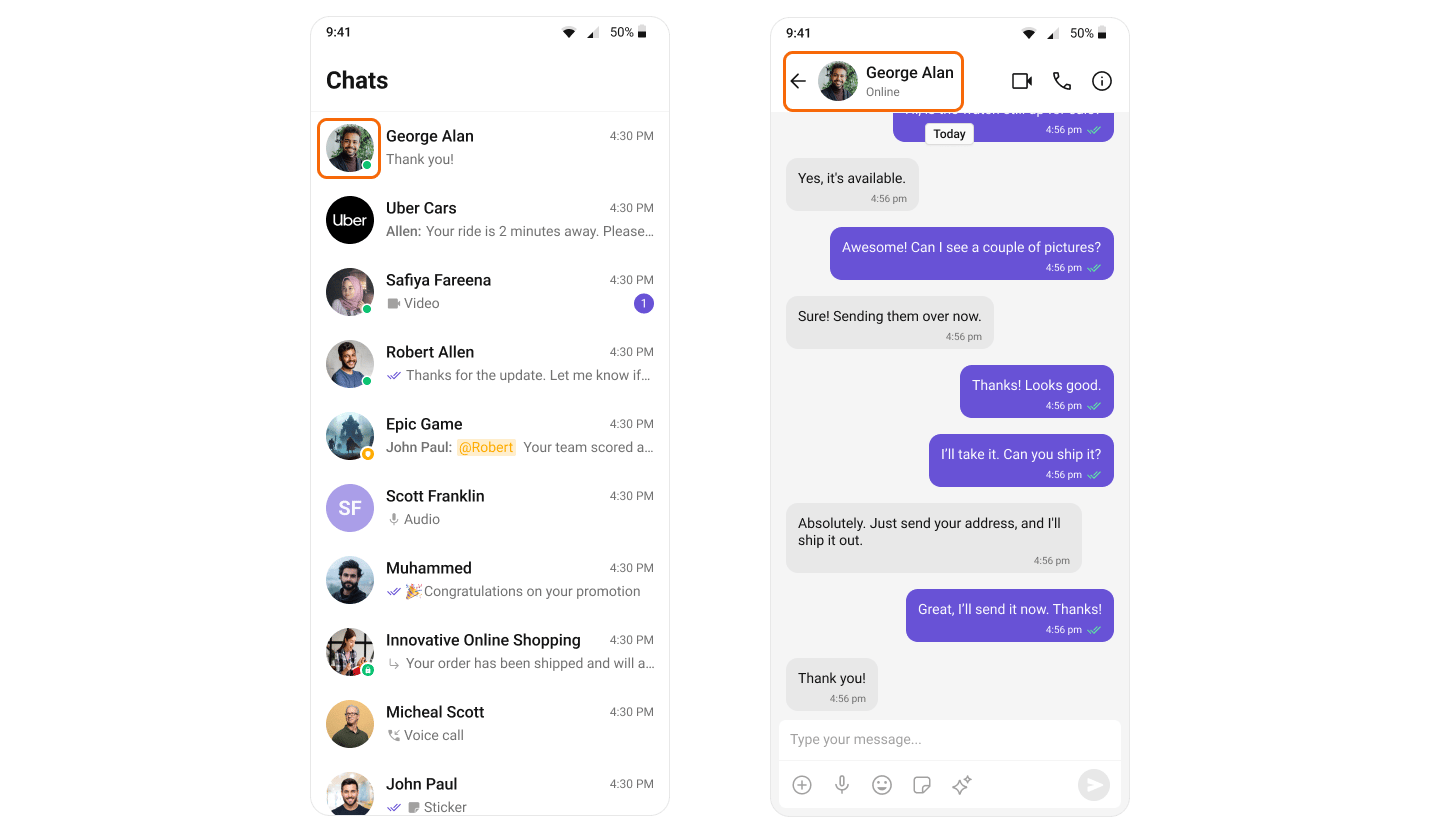
## User Presence
See whether contacts are online or offline.
 | Component | Role |
| ----------------------------------------------------------- | -------------------------------------------- |
| [CometChatConversations](/ui-kit/android/v6/conversations) | Shows user presence in conversation items. |
| [CometChatMessageHeader](/ui-kit/android/v6/message-header) | Displays user presence in the chat header. |
| [CometChatUsers](/ui-kit/android/v6/users) | Shows presence indicators in the user list. |
| [CometChatGroupMembers](/ui-kit/android/v6/group-members) | Shows presence indicators for group members. |
## Reactions
React to messages with emojis without typing a full response.
| Component | Role |
| ----------------------------------------------------------- | -------------------------------------------- |
| [CometChatConversations](/ui-kit/android/v6/conversations) | Shows user presence in conversation items. |
| [CometChatMessageHeader](/ui-kit/android/v6/message-header) | Displays user presence in the chat header. |
| [CometChatUsers](/ui-kit/android/v6/users) | Shows presence indicators in the user list. |
| [CometChatGroupMembers](/ui-kit/android/v6/group-members) | Shows presence indicators for group members. |
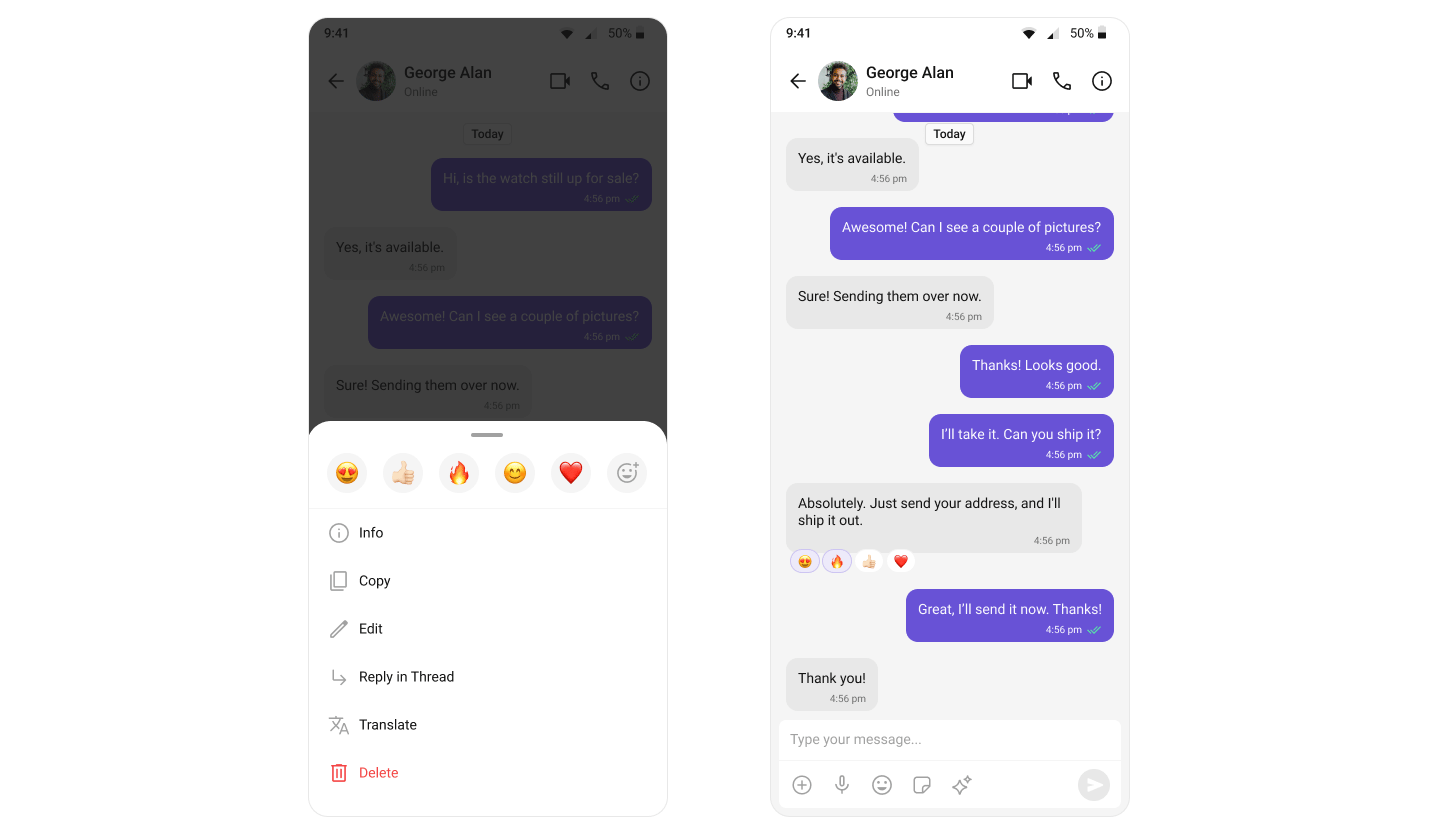
## Reactions
React to messages with emojis without typing a full response.
 | Component | Role |
| ------------------------------------------------------- | ----------------------------------------------------------------------- |
| [CometChatMessageList](/ui-kit/android/v6/message-list) | Displays reactions on message bubbles and provides the reaction picker. |
## Mentions
Address specific users in a conversation by typing `@` to trigger mention suggestions.
| Component | Role |
| ------------------------------------------------------- | ----------------------------------------------------------------------- |
| [CometChatMessageList](/ui-kit/android/v6/message-list) | Displays reactions on message bubbles and provides the reaction picker. |
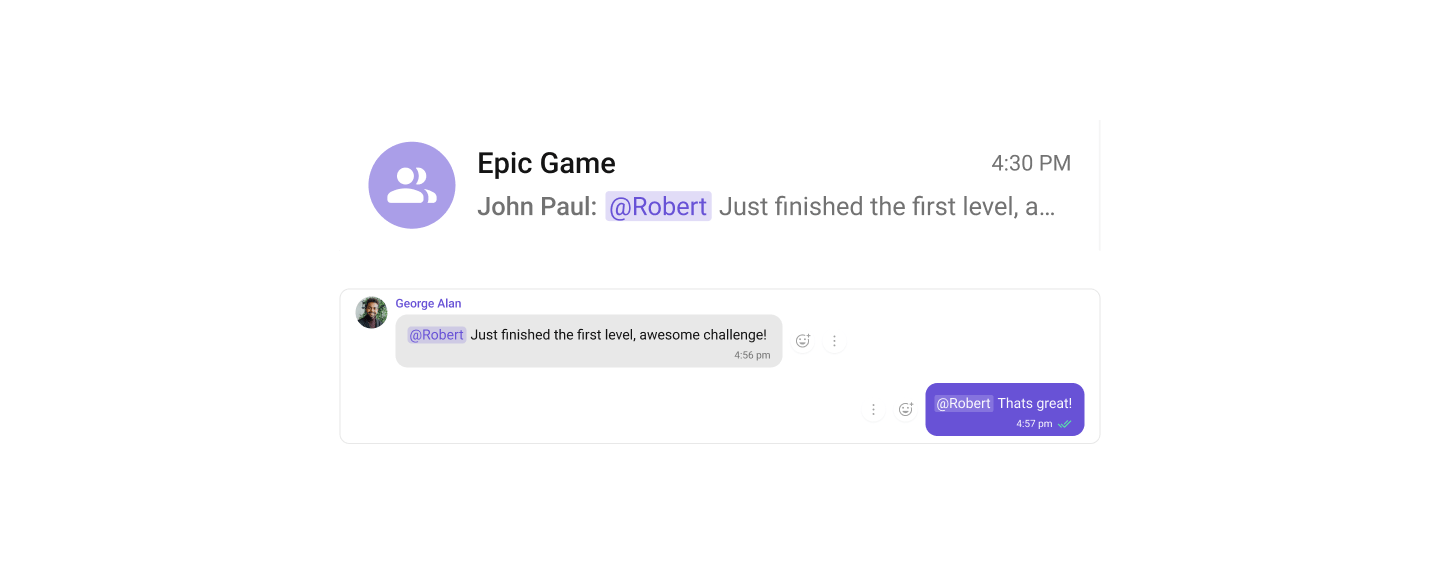
## Mentions
Address specific users in a conversation by typing `@` to trigger mention suggestions.
 | Component | Role |
| --------------------------------------------------------------- | ------------------------------------------------------------------- |
| [CometChatConversations](/ui-kit/android/v6/conversations) | Shows where users have been mentioned from the conversation list. |
| [CometChatMessageComposer](/ui-kit/android/v6/message-composer) | Triggers mention suggestions on `@` and inserts formatted mentions. |
| [CometChatMessageList](/ui-kit/android/v6/message-list) | Renders mentions with distinct styling in the message flow. |
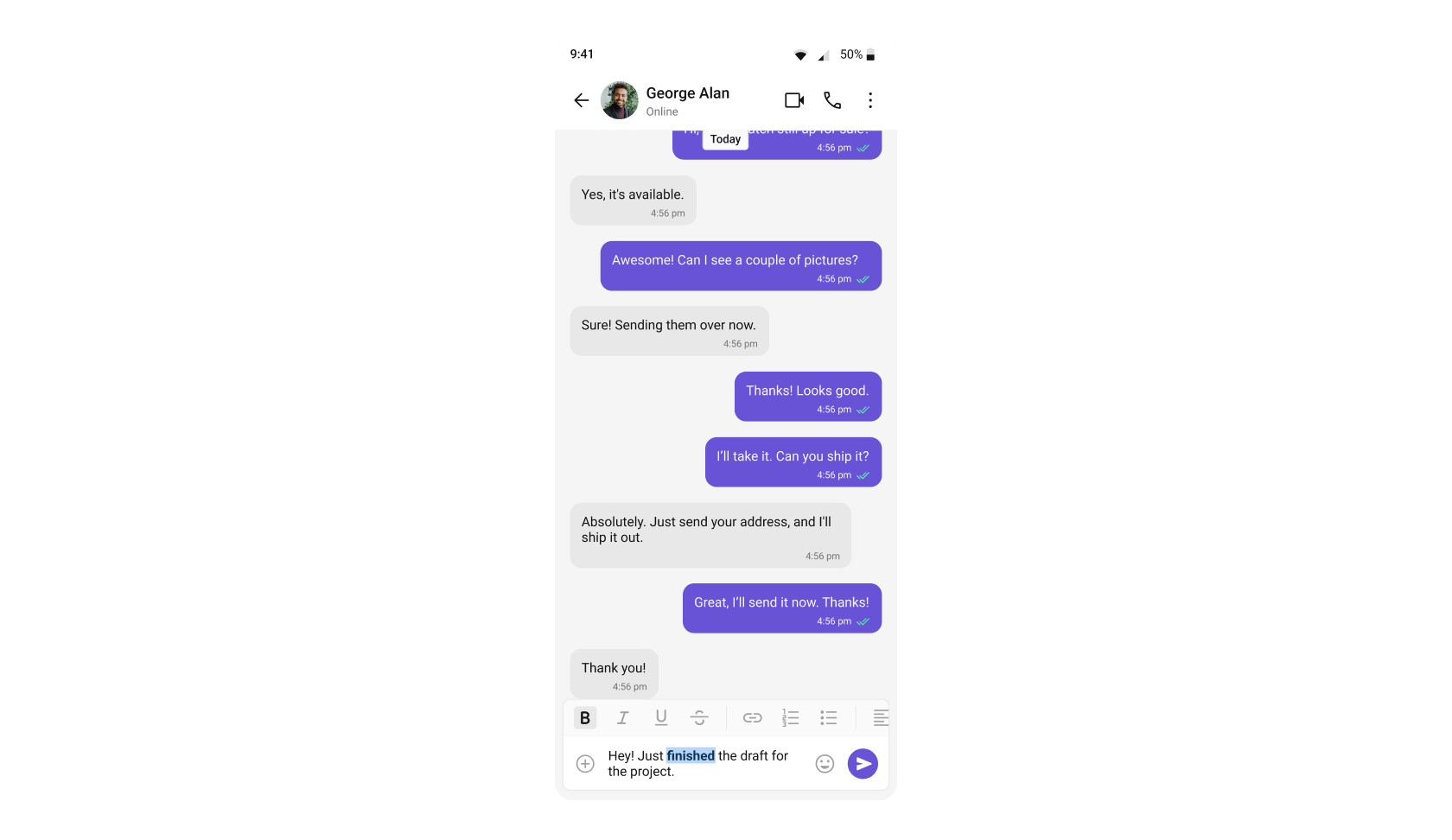
## Rich Text Formatting
Rich Text Formatting allows users to style their messages with bold, italic, strikethrough, code, code blocks, blockquotes, ordered/unordered lists, and links. This brings richer expression to conversations and helps users emphasize key points.
| Component | Role |
| --------------------------------------------------------------- | ------------------------------------------------------------------- |
| [CometChatConversations](/ui-kit/android/v6/conversations) | Shows where users have been mentioned from the conversation list. |
| [CometChatMessageComposer](/ui-kit/android/v6/message-composer) | Triggers mention suggestions on `@` and inserts formatted mentions. |
| [CometChatMessageList](/ui-kit/android/v6/message-list) | Renders mentions with distinct styling in the message flow. |
## Rich Text Formatting
Rich Text Formatting allows users to style their messages with bold, italic, strikethrough, code, code blocks, blockquotes, ordered/unordered lists, and links. This brings richer expression to conversations and helps users emphasize key points.
 | Component | Role |
| --------------------------------------------------------------- | ----------------------------------------------------------------------------------------------------------------------------------------------------------------------------- |
| [CometChatMessageComposer](/ui-kit/android/v6/message-composer) | Provides a built-in rich text editor with formatting toolbar and text selection menu items for bold, italic, strikethrough, code, links, lists, blockquotes, and code blocks. |
| [CometChatMessageList](/ui-kit/android/v6/message-list) | Renders formatted messages with the appropriate styling automatically applied, ensuring that rich text formatting is displayed exactly as intended by the sender. |
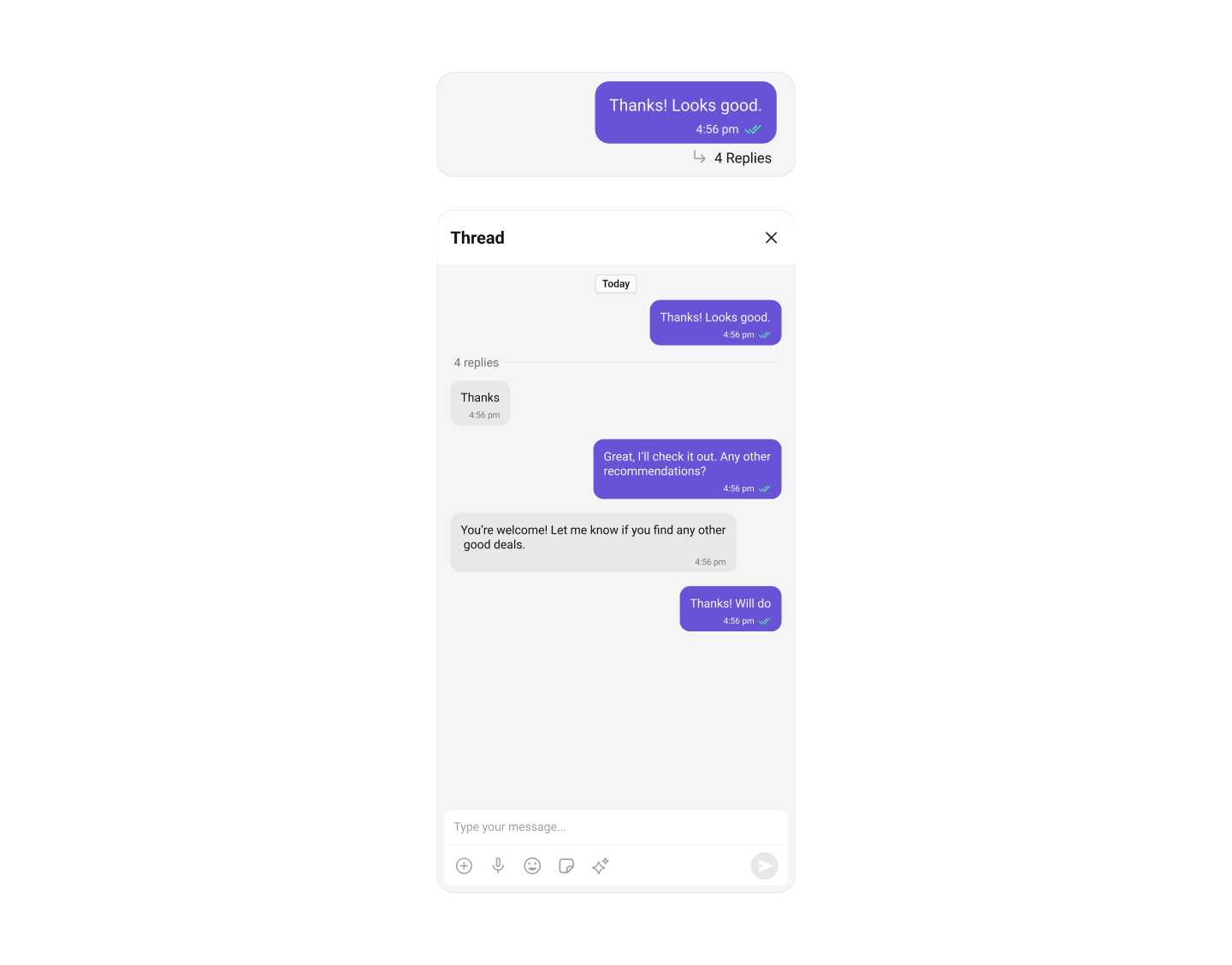
## Threaded Conversations
Respond directly to a specific message, keeping conversations organized.
| Component | Role |
| --------------------------------------------------------------- | ----------------------------------------------------------------------------------------------------------------------------------------------------------------------------- |
| [CometChatMessageComposer](/ui-kit/android/v6/message-composer) | Provides a built-in rich text editor with formatting toolbar and text selection menu items for bold, italic, strikethrough, code, links, lists, blockquotes, and code blocks. |
| [CometChatMessageList](/ui-kit/android/v6/message-list) | Renders formatted messages with the appropriate styling automatically applied, ensuring that rich text formatting is displayed exactly as intended by the sender. |
## Threaded Conversations
Respond directly to a specific message, keeping conversations organized.
 | Component | Role |
| -------------------------------------------------------------------- | -------------------------------------------------- |
| [CometChatThreadHeader](/ui-kit/android/v6/threaded-messages-header) | Displays all replies made to a particular message. |
| [CometChatMessageComposer](/ui-kit/android/v6/message-composer) | Allows composing messages within a thread. |
| [CometChatMessageList](/ui-kit/android/v6/message-list) | Displays threaded messages in context. |
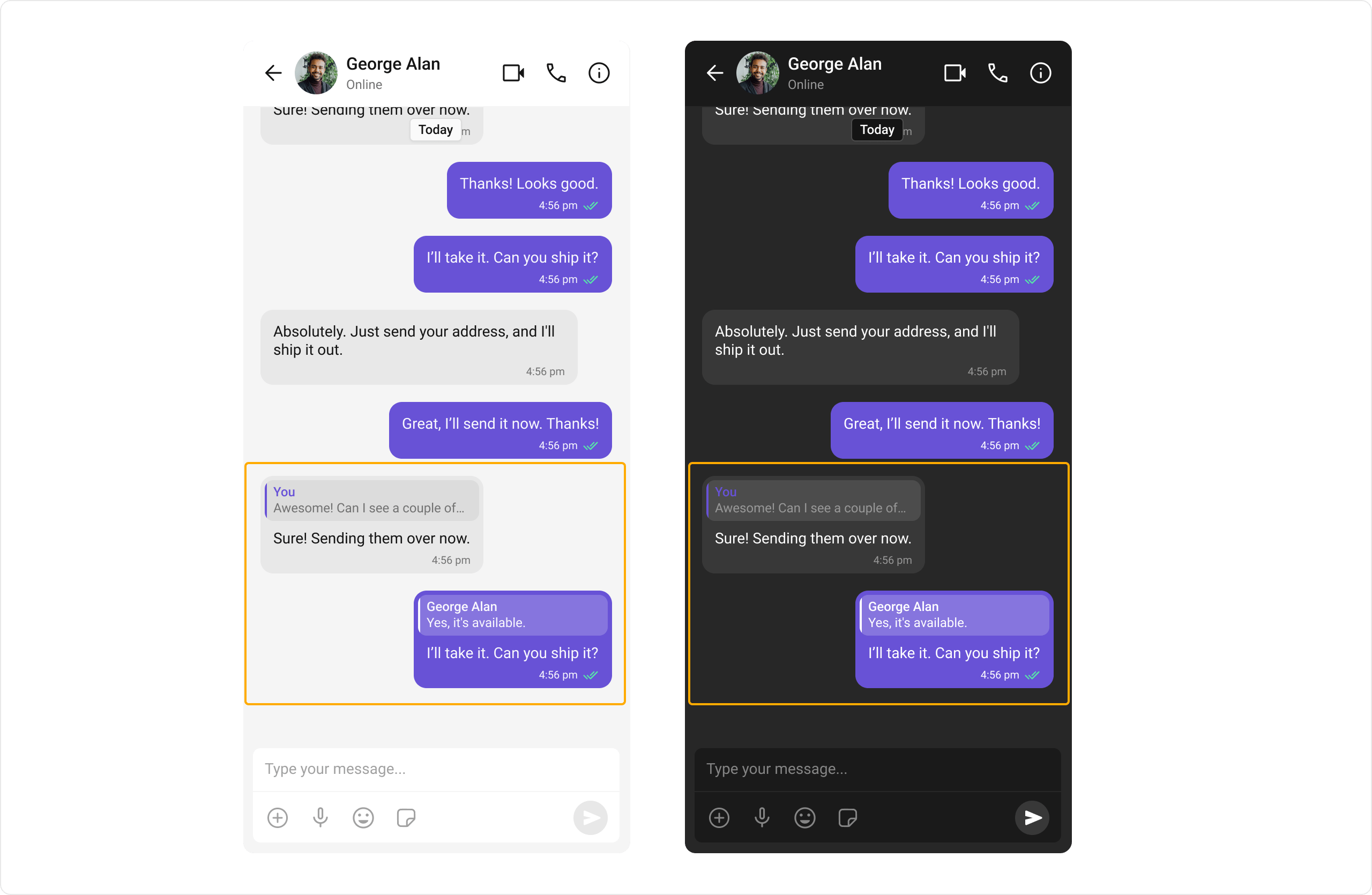
## Quoted Replies
Reply to specific messages by selecting "Reply" from the message action menu, maintaining context in the conversation.
| Component | Role |
| -------------------------------------------------------------------- | -------------------------------------------------- |
| [CometChatThreadHeader](/ui-kit/android/v6/threaded-messages-header) | Displays all replies made to a particular message. |
| [CometChatMessageComposer](/ui-kit/android/v6/message-composer) | Allows composing messages within a thread. |
| [CometChatMessageList](/ui-kit/android/v6/message-list) | Displays threaded messages in context. |
## Quoted Replies
Reply to specific messages by selecting "Reply" from the message action menu, maintaining context in the conversation.
 | Component | Role |
| --------------------------------------------------------------- | --------------------------------------------------------- |
| [CometChatMessageList](/ui-kit/android/v6/message-list) | Provides the "Reply" option in message actions. |
| [CometChatMessageComposer](/ui-kit/android/v6/message-composer) | Shows the quoted reply above the input field for context. |
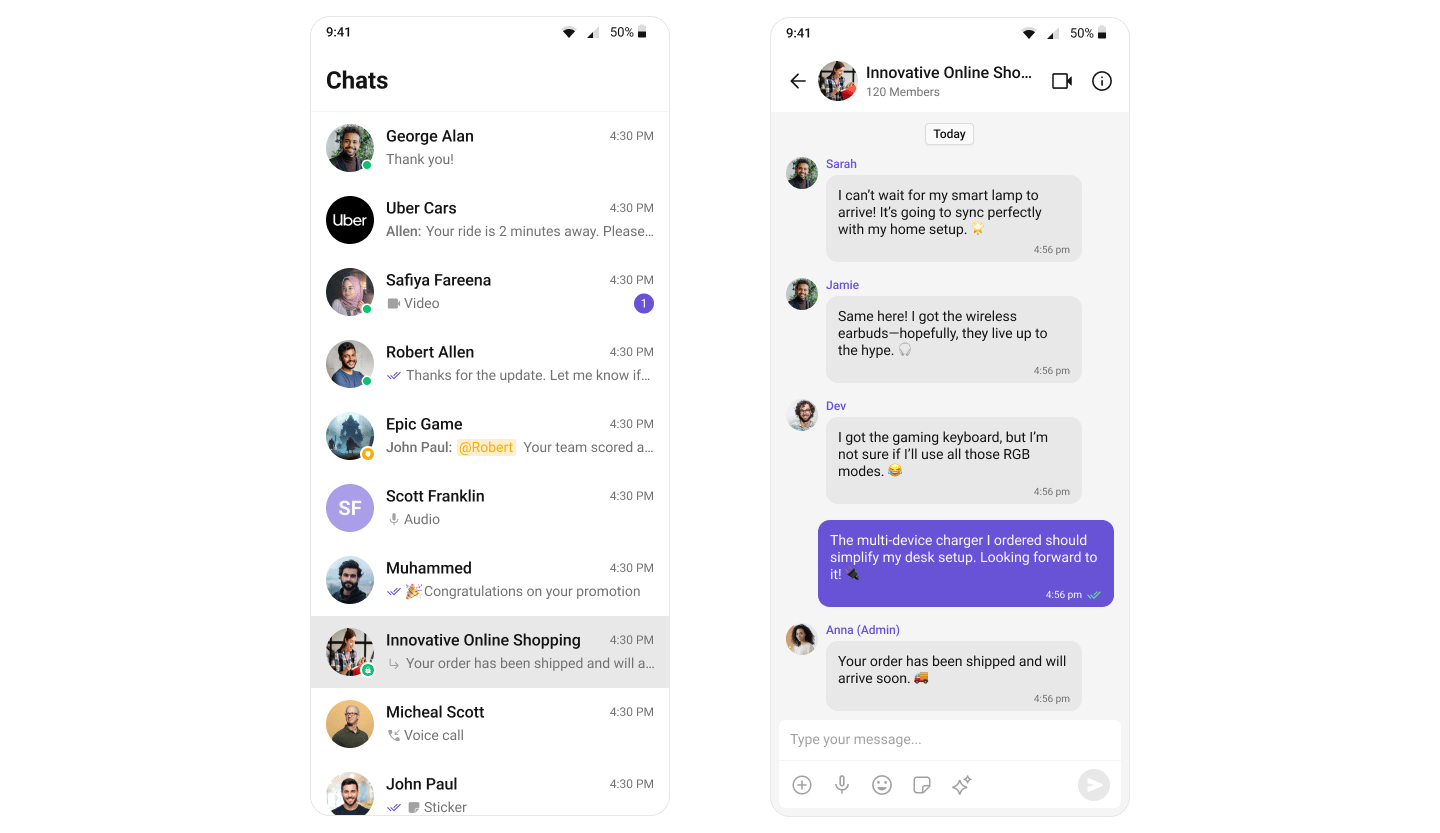
## Group Chats
Conversations with multiple participants — team collaborations, group discussions, and communities.
| Component | Role |
| --------------------------------------------------------------- | --------------------------------------------------------- |
| [CometChatMessageList](/ui-kit/android/v6/message-list) | Provides the "Reply" option in message actions. |
| [CometChatMessageComposer](/ui-kit/android/v6/message-composer) | Shows the quoted reply above the input field for context. |
## Group Chats
Conversations with multiple participants — team collaborations, group discussions, and communities.
 | Component | Role |
| --------------------------------------------------------- | ---------------------------------------------------------- |
| [CometChatGroups](/ui-kit/android/v6/groups) | Lists and manages groups. |
| [CometChatGroupMembers](/ui-kit/android/v6/group-members) | Displays and manages group members with roles and actions. |
## Moderation
Automatically filter and manage inappropriate content based on predefined rules.
| Component | Role |
| --------------------------------------------------------- | ---------------------------------------------------------- |
| [CometChatGroups](/ui-kit/android/v6/groups) | Lists and manages groups. |
| [CometChatGroupMembers](/ui-kit/android/v6/group-members) | Displays and manages group members with roles and actions. |
## Moderation
Automatically filter and manage inappropriate content based on predefined rules.
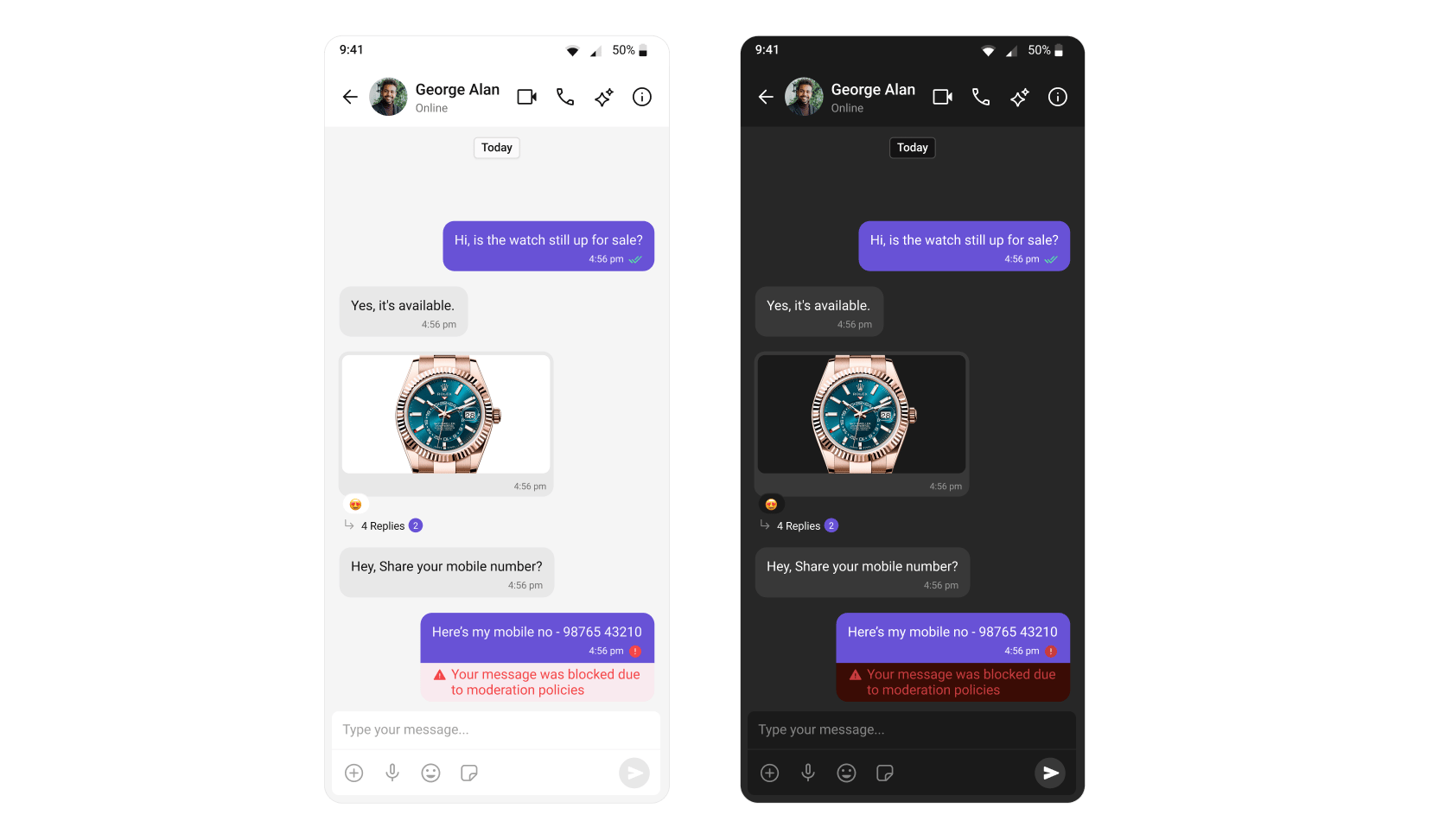 Learn more about setting up moderation rules in the [Moderation](/moderation/overview) documentation.
| Component | Role |
| ------------------------------------------------------- | ----------------------------------------------------------------------------------------- |
| [CometChatMessageList](/ui-kit/android/v6/message-list) | Handles moderated messages, displaying blocked content based on your moderation settings. |
## Report Message
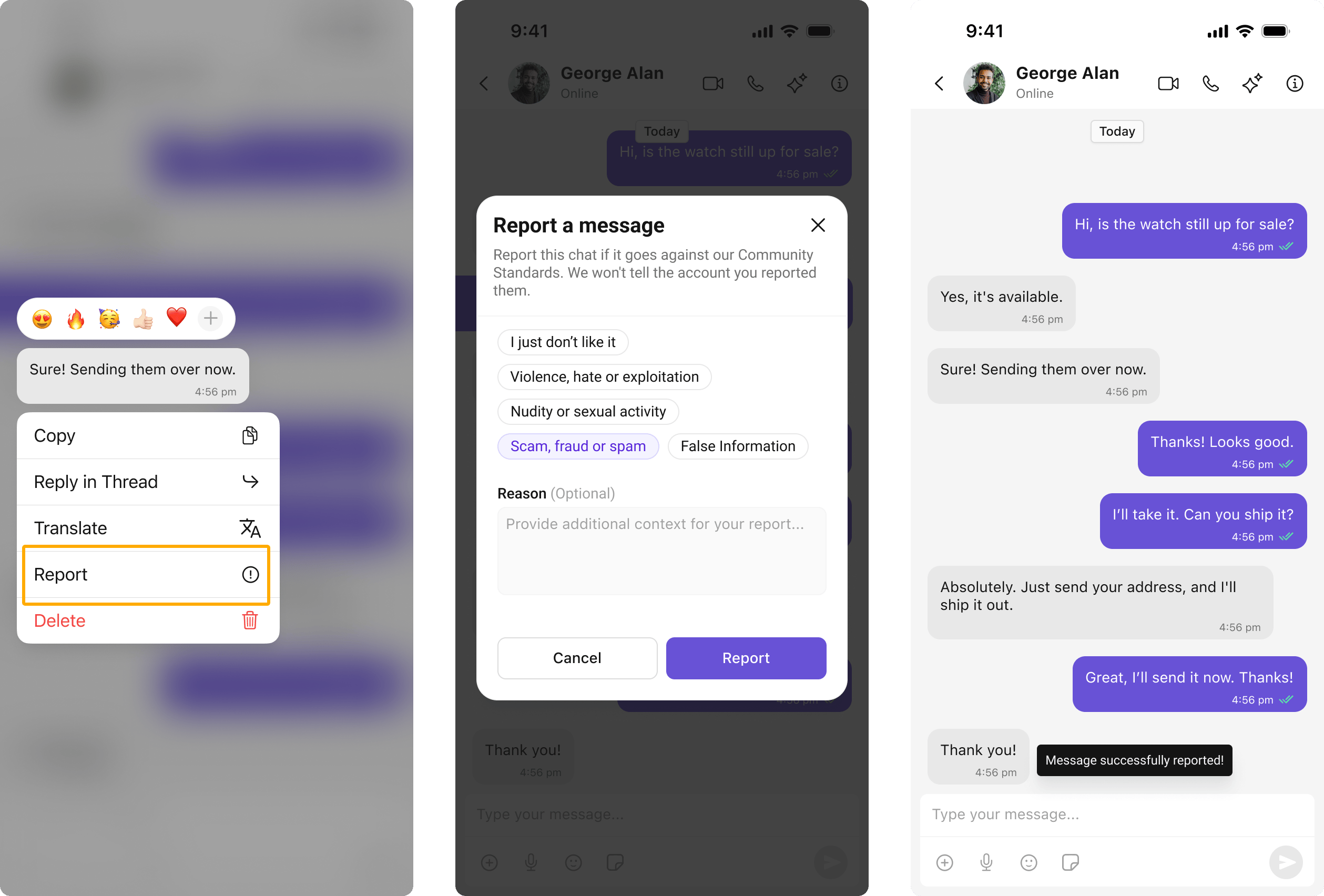
Users can report inappropriate messages by choosing from predefined reasons with optional remarks.
Learn more about flagged messages in the [Flagged Messages](/moderation/flagged-messages) documentation.
Learn more about setting up moderation rules in the [Moderation](/moderation/overview) documentation.
| Component | Role |
| ------------------------------------------------------- | ----------------------------------------------------------------------------------------- |
| [CometChatMessageList](/ui-kit/android/v6/message-list) | Handles moderated messages, displaying blocked content based on your moderation settings. |
## Report Message
Users can report inappropriate messages by choosing from predefined reasons with optional remarks.
Learn more about flagged messages in the [Flagged Messages](/moderation/flagged-messages) documentation.
 | Component | Role |
| ------------------------------------------------------- | -------------------------------------------------------- |
| [CometChatMessageList](/ui-kit/android/v6/message-list) | Provides the "Report Message" option in message actions. |
## Conversation and Advanced Search
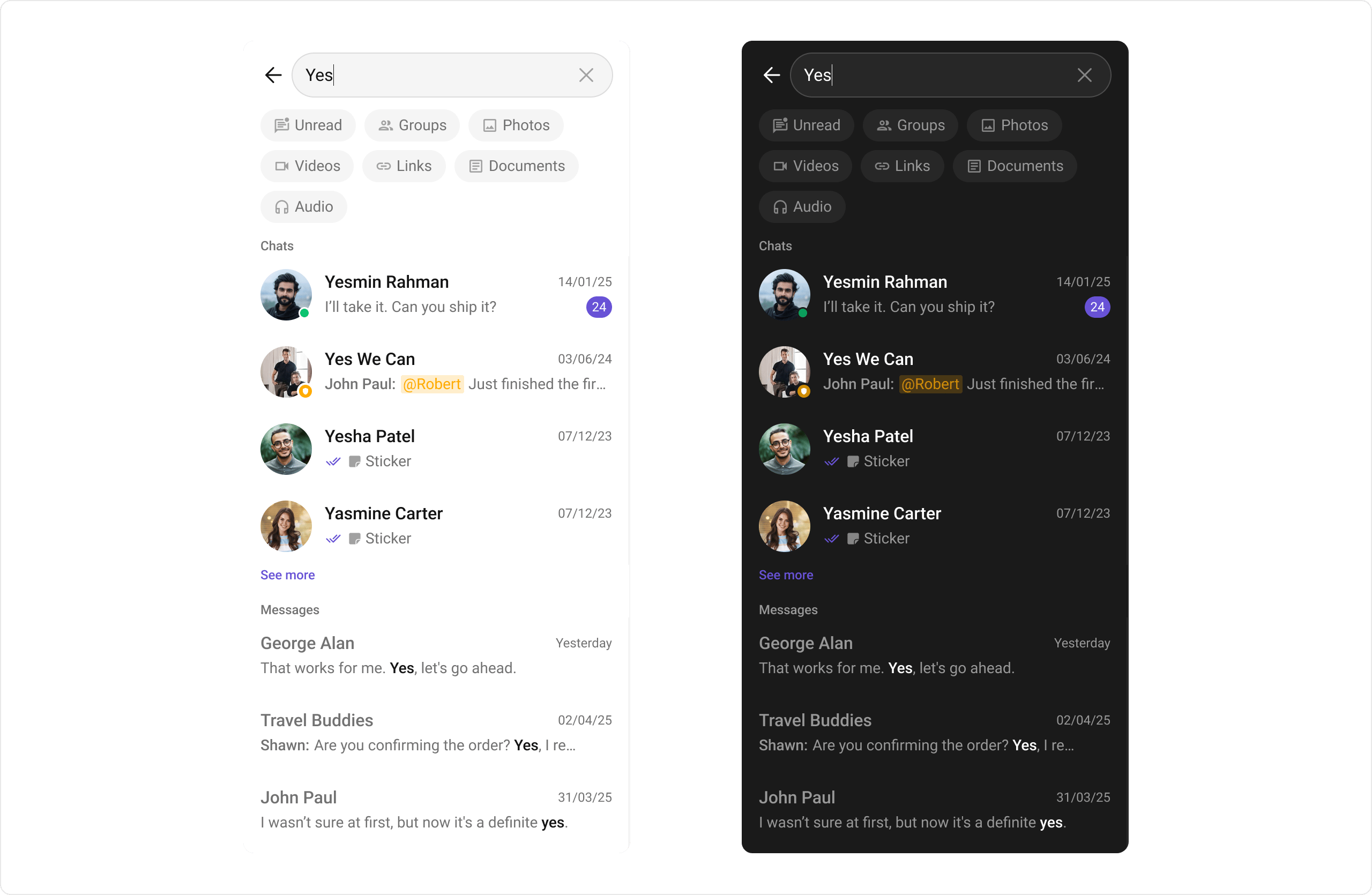
Conversation and Advanced Search enables users to quickly find conversations, messages, and media across chats in real time. It supports filters, scopes, and custom actions, allowing users to locate content efficiently while keeping the chat experience smooth and intuitive.
| Component | Role |
| ------------------------------------------------------- | -------------------------------------------------------- |
| [CometChatMessageList](/ui-kit/android/v6/message-list) | Provides the "Report Message" option in message actions. |
## Conversation and Advanced Search
Conversation and Advanced Search enables users to quickly find conversations, messages, and media across chats in real time. It supports filters, scopes, and custom actions, allowing users to locate content efficiently while keeping the chat experience smooth and intuitive.
 | Component | Role |
| ----------------------------------------------------------- | ------------------------------------------------------------------------------------------------------------------------------------------------------------------- |
| [CometChatSearch](/ui-kit/android/v6/search) | Allows users to search across conversations and messages in real time. Users can click on a result to open the conversation or jump directly to a specific message. |
| [CometChatMessageHeader](/ui-kit/android/v6/message-header) | Shows the search button in the chat header, allowing users to search within a conversation. |
| [CometChatMessageList](/ui-kit/android/v6/message-list) | Shows the selected message when clicked from search results and highlights it in the message list. |
| [CometChatConversations](/ui-kit/android/v6/conversations) | Displays the search input. |
***
## Next Steps
Browse all available UI Kit components
Customize the look and feel of your chat UI
Add audio and video calling
Explore AI-powered chat capabilities
| Component | Role |
| ----------------------------------------------------------- | ------------------------------------------------------------------------------------------------------------------------------------------------------------------- |
| [CometChatSearch](/ui-kit/android/v6/search) | Allows users to search across conversations and messages in real time. Users can click on a result to open the conversation or jump directly to a specific message. |
| [CometChatMessageHeader](/ui-kit/android/v6/message-header) | Shows the search button in the chat header, allowing users to search within a conversation. |
| [CometChatMessageList](/ui-kit/android/v6/message-list) | Shows the selected message when clicked from search results and highlights it in the message list. |
| [CometChatConversations](/ui-kit/android/v6/conversations) | Displays the search input. |
***
## Next Steps
Browse all available UI Kit components
Customize the look and feel of your chat UI
Add audio and video calling
Explore AI-powered chat capabilities